
Here are step-by-step instructions for generating and viewing your payroll billing:
PAYROLL INVOICE PREVIEW
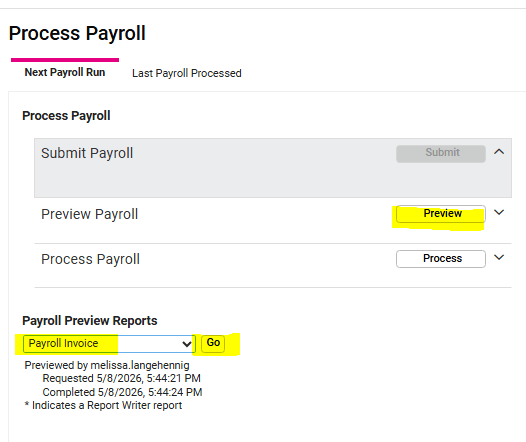
BEFORE processing payroll, the Payroll Invoice can be previewed:
-
Go to PAYROLL PROCESSING > Process Payroll.
-
Click PREVIEW.
-
Under Payroll Preview Reports, select Payroll Invoice from the dropdown menu.
-
Click GO.
-
The report will open in a separate browser tab.
REVIEWING THE ARCHIVED PAYROLL INVOICE
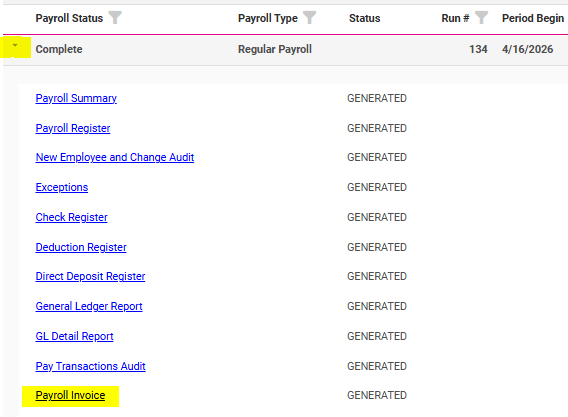
AFTER payroll is processed, the Payroll Invoice can be viewed with the other archived payroll reports:
-
Go to REPORTING > Report Archive.
- Click the arrow next to the Payroll you want to view to open the reports list.
- Click the Payroll Invoice report link to open in a separate browser tab.
EMPLOYER LIABILITY REPORT
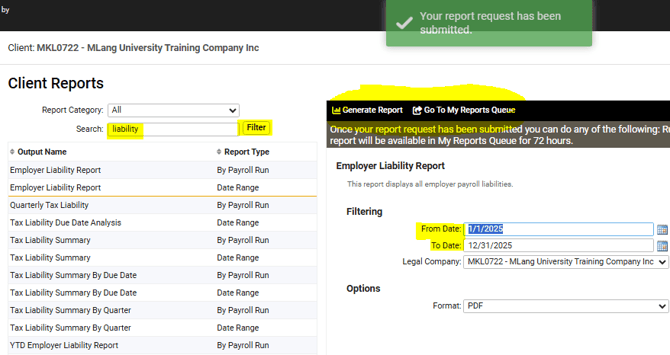
The Employer Liability Report can be generated for a specified date range and includes the payroll billing details. To generate the report:
-
Go to REPORTING > Client Reports.
- Type liability in the Search field and click FILTER.
- Select the EMPLOYER LIABILITY REPORT from the list.
- Enter the desired From and To Dates.
- Click Generate Report in the black bar.
- A green confirmation box will pop up.
- Click Go To My Reports Queue in the black bar.
- When the report is fully generated, click the View Report link to open the report in a separate browser tab.
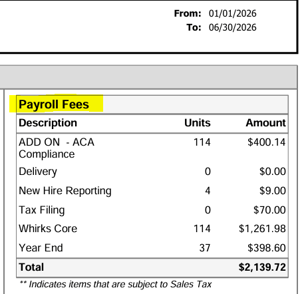
- Summarized Payroll Billing information will be displayed in the top right-hand box, with detailed information listed below.
 What Else Should I Know?
-
If you have any questions about charges listed on your Payroll Invoice, please reach out to your Client Success Specialist before processing so we can help determine if something needs to be corrected.