
To send all garnishment orders securely, use this link: Whirks Secure Upload
Here's a bit more about what happens with the garnishment once you send it to us:
-
Your Client Success Specialist will set up the garnishment according to the instructions on the order.
-
On pay day, the required dollars will automatically be withheld from the employee's pay check.
-
We send all Child Support payments via ACH. This means that amount will be included in the Total ACH Debit amount on your Payroll Summary, and listed as "Third Party Electronic Payment."
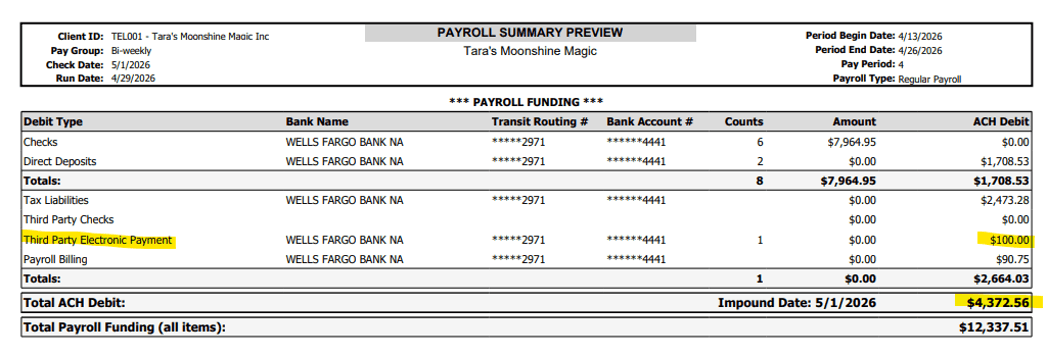
-
For all other garnishment types, a live check will be mailed directly to the issuing agency, and the funds will come out of your company bank account once the agency processes the check. This will appear on your Payroll Summary under "Third Party Checks."
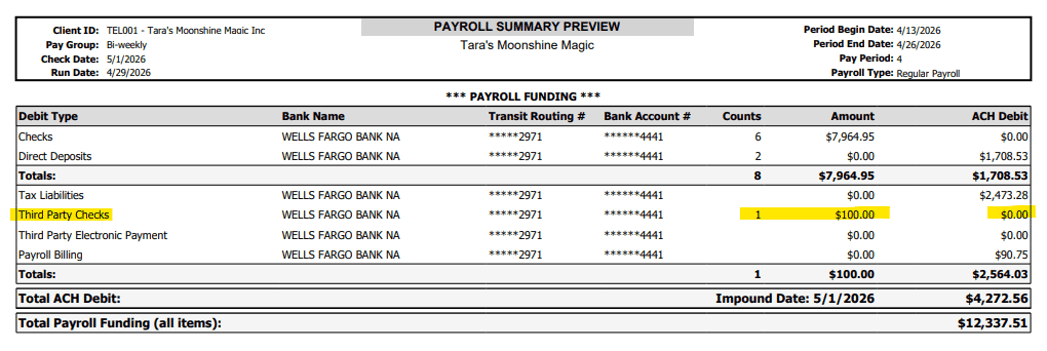
NOTE: There is a $1.25 postage fee or each third-party check mailed.
 What Else Should I Know?
-
Although our team will handle the garnishment payments on your behalf, all other communication with the garnishing agency should be done by your internal team. For example, some garnishments include paperwork or questionnaires that the company must complete and return to the issuing agency.
-
As an employer, you are required to notify the issue agency of an employee's termination as promptly as possible. The required information to be sent is often located on the last page (or near the end) of the original garnishment order. Because of this, we recommend uploading a copy of the garnishment order to the employee's profile for indefinite digital storage. For more guidance on how to do that, please refer to this article.
- Please be sure to send over all updated garnishment orders as you receive them so we can be sure to have the most recent data setup in isolved.