
Here are some step-by-step instructions on how to get a replacement paycard for your employee:
-
Go to EMPLOYEE MANAGEMENT > Employee Pay > Direct Deposit.
-
Click the pencil icon on the right to edit the Status of the lost/stolen card to "Inactive" by using the drop-down menu.
-
Click Save in the black bar.
NOTE: It is important to complete these first three steps as soon as you are notified by the employee that their paycard is missing. This prevents any additional funds from being deposited onto the missing card accidentally.
-
Go to CLIENT MANAGEMENT > Client Landing Page.
-
Click the "Paycard Enrollment Form" link in the Quick Links box at the top right.
-
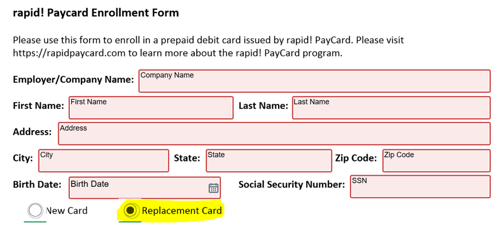
Complete all fields on the form, selecting the radio button for "Replacement Card" towards the bottom.
-
Once all of the fields are filled (outlined in green), click the Finish button at the bottom to submit the form securely to your Client Success Specialist.
-
Your CSS will inactivate the old paycard and register a replacement card within the Rapid! Paycard site. They will also add the card account information to the the employee's Direct Deposit screen in isolved.
-
The new card will be delivered with your regular payroll deliverables on the next scheduled check date.
NOTE: If your employee needs the new card prior to the next scheduled check date, please reach out to your CSS to arrange early delivery/pick-up.
 What Else Should I Know?
-
As with the original card, the employee must activate the replacement card by calling the number listed on the back of the card before attempting to use for payment or ATM withdraws.
-
If there any issues arise with the transfer of funds, the customer service number on the back of the card can be used for assistance. If you need any additional help, please reach out to your CSS, and they can contact Rapid! Paycard on your behalf.