
Shortly after we have filed your payroll tax returns, they are available for you to view and/or download directly within isolved. Here are step-by-step instructions for viewing your filed payroll returns:
-
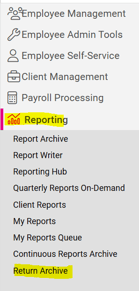
Go to REPORTING > Return Archive.
- Select Year from the dropdown list provided.
-
Select the desired quarter, month, or "All" from the Period dropdown list provided.
- Select "ALL" or the desired State from the Federal/State dropdown list provided.
- Click the Filter button.
- Click View Report link to open the desired report as pdf in a separate browser tab.
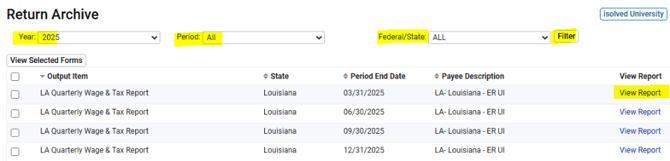
NOTE: If you would like to download multiple returns at once, select each desired return by checking the box on the far left, then click the "View Selected Forms" button on the left, above the document list.
 What Else Should I Know?
-
All filed returns post to the Return Archive by the 20th of the filing month. If you do not see the blue "View Report" link, please reach out to your Client Success Specialist for assistance.