
To keep the updated form on file, upload it to the employee's documents:
-
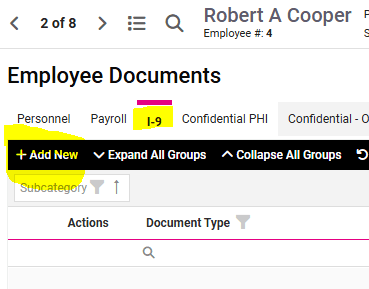
Go to EMPLOYEE MANAGEMENT > Human Resources > Employee Documents.
-
Select the employee from the Employee List.
- Click on the I-9 tab and lick Add New in the black bar.
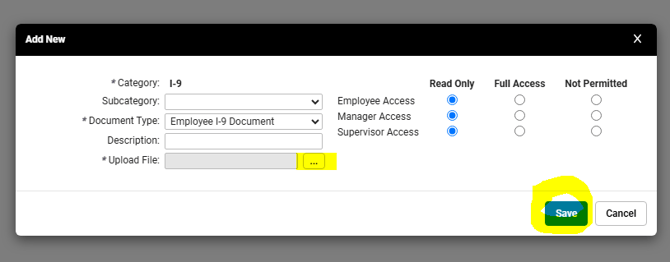
- Use the drop-down menu to select "Employee I-9 Document" as the Document Type. You can enter additional information in the Description field, but this is optional. Use the three dots to Upload the File from your computer.
- Use the radio buttons to set desired access permissions for the employee and their manager and/or supervisor, as appropriate. (NOTE: "Read Only" will allow them to view the document, but not make any changes. "Full Access" will allow them to change or delete the document. "Not Permitted" will restrict this form form being accessible at all.)
- Click Save.
This ensures a clear record of any changes made after the original I-9 was submitted.
 What Else Should I Know?
-
Employers are required to have every new employee complete Section 1 of Form I-9 by their first day of work. They must also review the employee's identification/work authorization documents provided and complete Section 2 within three business days of the employee's start date. A completed Form I-9 for every employee must be retained for up to one year following termination of employment and made available if requested during a government inspection. Failure to properly complete, retain, or produce Form I-9 can result in significant penalties.
- Be sure to review if your state requires participating in e-verify with the USCIS upon completion.