
Here are step by step instructions on how to submit a request for a pay card.
Completing a Paycard Enrollment Form
-
Login to your isolved admin account from https://whirks.myisolved.com.
-
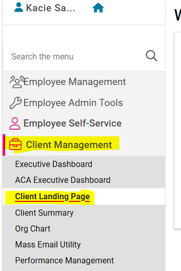
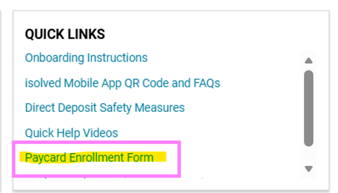
From CLIENT MANAGEMENT > Client Landing Page, click the "Paycard Enrollment Form" link in the Quick Links box at the top right.
-
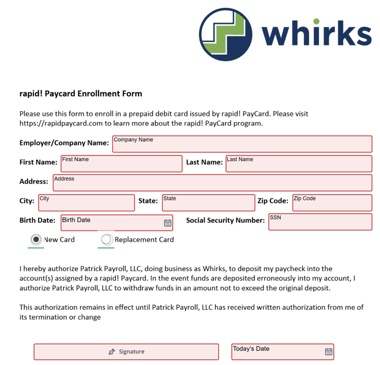
Complete all fields listed with the appropriate information.
-
Once complete, the fields will be outlined in green. Click the green Finish button at the bottom to submit the form securely to your Client Success Specialist.

-
Once received, your CSS will register the employee's paycard with Rapid! Paycard, enter the account information into isolved on the employee's Direct Deposit screen, and send it with all other payroll deliverables on the next scheduled pay date.
NOTE: The employee's card will be registered and all applicable funds loaded, however, they must first activate the card by calling the number located on the back of the card. They will validate their identity with their birth date and SSN, so it is important that this information matches what is in isolved.
 What Else Should I Know?
-
If an employee does not have an active bank account available for direct deposit, a paycard can be a great option, both for its security of funds and ease of delivery. Feel free to share this short video with your employees explaining the benefits to using a paycard.
- For additional information regarding Rapid! paycards, please visit their website using this link.
-
If an employee's paycard is lost or stolen, a replacement card can be issued. For addtional guidance, please refer to this article.
-
Whirks works exclusively with Rapid! Paycard services for employee paycards. Employees can use their own paycard option for Direct Deposit purposes, but Whirks would not be able to assist with any deposit issues or card replacements in this case.
-
Sadly, paycards have become a means for fraudulent activity recently. It is imperative to review your New Employee and Change Audit report when preparing each payroll. The Activated Direct Deposit section will display all new accounts added for direct deposit since the last payroll was processed. If you see any suspicious data, be sure to verify the entry with your employee BEFORE submitting your payroll for processing.
