
Here are step-by-step instructions on how employees can access their W-2s, either on the web or through the isolved app:
ACCESSING W2 FORM IN EMPLOYEE SELF-SERVICE ("CLASSIC VIEW" )
-
To access their Employee Self-Service (ESS) account through the classic browser view, the employee will begin by signing in at https://whirks.myisolved.com.
-
Navigate to EMPLOYEE SELF-SERVICE > W2/ACA/1099 FORMS.
-
Click the View Document link. (A separate browser tab will open while the form is generating.)
-
Once full generated, the document will be available in the employee's Downloads folder.

ACCESSING W2 FORM IN ADAPTIVE EMPLOYEE EXPERIENCE ( "EMPLOYEE WORKSPACE VIEW" )
-
To access their ESS account through the Adaptive Employee Experience, the employee will begin by signing in at https://aee.myisolved.com (which can be done from any mobile device or regular desktop computer), or by using the isolved People Cloud mobile app.
-
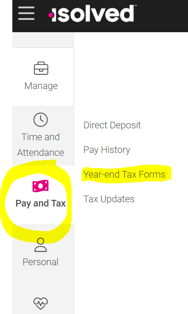
Navigate to PAY AND TAX > Year-end Tax Forms.
-
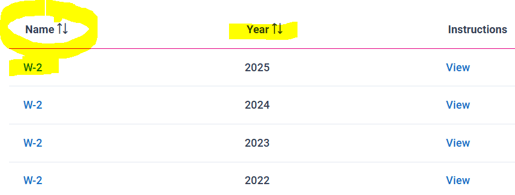
Click on the W-2 link listed under the "Name" column on the left-hand side for the desired year.
-
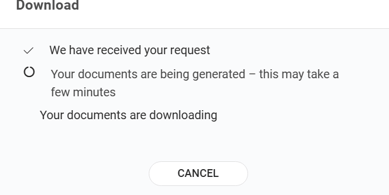
They will receive a download confirmation message while their documents are generating.
-
Once generated, the W2 will open automatically (or be available in) their pdf application, such as Adobe or FoxIt.
NOTE: The View button in the "Instructions" column provides filing instructions and code explanations only, not the actual W2.
 What Else Should I Know?
-
If the employee opted out of "Electronic-Only Delivery" when activating their Self-Service account, a paper version of their W-2 will be mailed to their home address in isolved by the January 31st deadline. However, they will also have access to the digital copy within their Self-Service account indefinitely.
-
All previously terminated employees continue to have access to their isolved Self-Service accounts. Therefore, if they reach out to you to say they did not receive their W-2 as expected, the easiest, fastest, and most secure way to provide them with a copy is to ensure they are able to log into their Self-Service account.
Please see this article if you are trying to troubleshoot why your employee did not receive their W-2 as expected.