
If an employee's PTO balance did not update when the hours were paid out, it is likely the PTO hours were manually entered on the Time Entry Grid, instead of an absence record being entered on the Employee Absence screen.
Here are step-by-step instructions to see what absences have been entered for an employee:
- Log into your Client User account at https://whirks.myisolved.com.
- Go to EMPLOYEE SELF-SERVICE > Time > Employee Absences.
- Select the employee from the Employee List.
- Enter the Date Range to be reviewed.
- Click Filter.
- All recorded absences that have been created for that date range will be listed. Processed absences have already been included in a processed payroll. Approved absences have been approved by the designated PTO Approver but will not be paid out to the employee until the Date listed falls within your current pay period. Pending absences must still be approved before they will be included in your payroll processing.
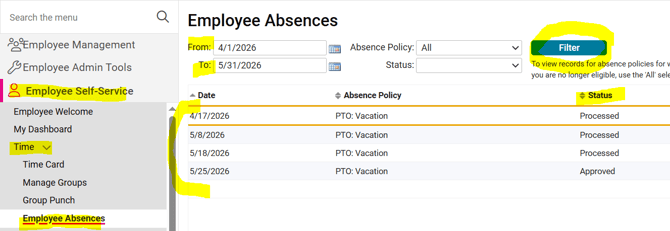
If the hours that were paid to the employee are not listed within the date range containing the pay period, then those hours were manually added to the Time Entry Grid and were therefore paid, but the employee's balance remained unchanged.
For additional guidance on how you can update an employee's PTO balance that is incorrect, please refer to this article.
If this Absence was entered on the Absence screen but not paid out, please reach out to your Client Success Specialist for assistance.
 What Else Should I Know?
- Time Off Request approval workflows can be created to be reviewed and approved by multiple users within your company. If you are needing a tiered workflow so that multiple leaders or departments should be notified of employees' time off, please reach out to you Client Success Specialist.