
Here's a more in-depth look into the Federal Income Tax withholding in isolved:
HOW FEDERAL INCOME TAX IS CALCULATED IN ISOLVED
-
isolved uses the current IRS Publication 15-T calculation process in determining an employees total Federal Tax withholding amount. The steps in this calculation process utilize the pay frequency, gross (taxable) income amount for the pay period, and the employee's W-4 designations.
-
There is a taxable income threshold set by the IRS that must be met in the pay period to trigger Federal Income Tax withholding. The calculation stps and tax tables are available in the IRS Publication 15-T (2026).
-
If no Federal Income Tax is being withheld, it could be due to one of the following reasons:
-
-
The employee's Filing Status type has a higher taxable income threshold than what is included in their gross wages for the current paycheck.
-
The number of dependents the employee has indicated in Step 3 of their W-4 creates a significant reduction in their taxable income calculation.
-
The employee has indicated that they are "exempt" from Federal income tax when completing their W-4.
-
VIEWING AN EMPLOYEE'S TAX SETTINGS IN ISOLVED
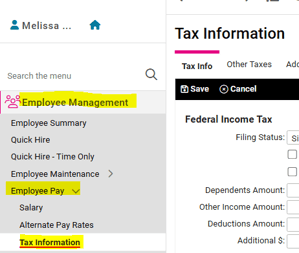
The current designations for the employee’s W-4 and any state withholding designations can be viewed under EMPLOYEE MANAGEMENT > Employee Pay > Tax Information.
VIEWING AN EMPLOYEE'S W-4 AND STATE WITHHOLDING FORMS
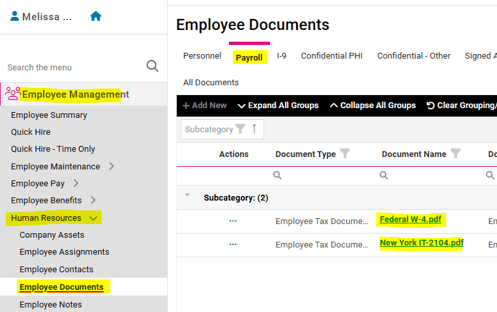
If the employee completed electronic onboarding in isolved, their W-4 and state withholding forms should be stored as pdf files under EMPLOYEE MANAGEMENT > Human Resources > Employee Documents on the Payroll tab. Click on the blue document link to open the pdf in a separate browser tab.
EMPLOYEE'S NEXT STEPS
If the employee is concerned, we recommend they speak to their tax professional or access the Tax Withholding Estimator | Internal Revenue Service to determine the best way to complete their W-4 designations for their particular tax situation.
The employee can update their W-4 in their Employee Self Service account. Simply log into https://aee.myisolved.com, navigate to EMPLOYEE SELF-SERVICE > Tax Updates Wizard, and click Start to complete the wizard.
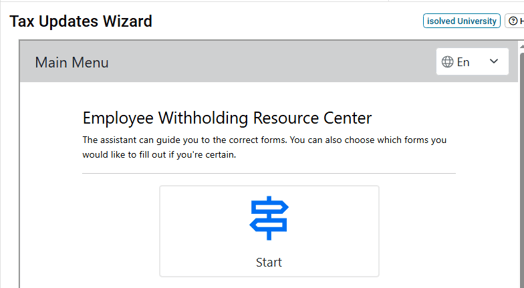
Once completed, the form(s) is saved under Employee Documents, and the Tax Information screen is automatically updated with the new W-4 designations.
For more guidance on how an employee can update their W-4 form, please refer to this article.
 What Else Should I Know?
-
The updated W-4 form and yearly Publication 15-T calculations are meant to help an employee have only that which will be truly owed for Federal Income tax withheld from their pay. The overall goal is for the employee to neither owe additional taxes, nor receive a significant refund, upon filing. The Tax Withholding Estimator (link provided above) can help the employee understand all of the contributing factors to their annual tax liability.
-
If an employee would like to ensure a specific amount is withheld by year end, they can update their W-4 to include a specified "Additional Amount" to be withheld from each paycheck. Please reach out to your Client Success Specialist if you have any questions about how to help your employee achieve this.